
Throne and Liberty [Notice] Advance Notice of Server Migration
Hello. This is THRONE AND LIBERTY.
We are writing to inform you in advance that a server migrationis scheduled to take place from 12:00 on Tuesday, 28 July 2026.
Please refer to the details below for further information regarding the server migration.
※ The server migration will take place at regular intervals, and we are making preparations to ensure you can continue to use the service without interruption.
However, please note that the intervals between migrations may change depending on operational circumstances, so please check the announcements provided at the time of each migration.
However, please note that the intervals between migrations may change depending on operational circumstances, so please check the announcements provided at the time of each migration.
■ Server Migration Period
- Server migration period: From 12:00 on Tuesday, 28 July 2026 to 22:00 on Friday, 31 July 2026
※ There is a limit on the number of players that can be transferred to each server; if the number of incoming characters exceeds this limit, you will not be able to apply for a transfer to that server.
Please bear this in mind and complete your transfer well before the deadline to ensure a smooth process.
■ Server Transfer Ticket Sales Period and Purchase Restrictions
- Sales Period: From 12:00 on Tuesday, 28 July 2026 to 22:00 on Friday, 31 July 2026
- Purchase Limit: 2 per account
- Purchase Method:
※ Server Transfer Vouchers are no longer displayed separately in the Special Shop; the system has been updated so that you can purchase them directly from the [Server Transfer] screen.
1) Click the ‘Purchase’ button in the bottom-right corner of the [Server Transfer] screen
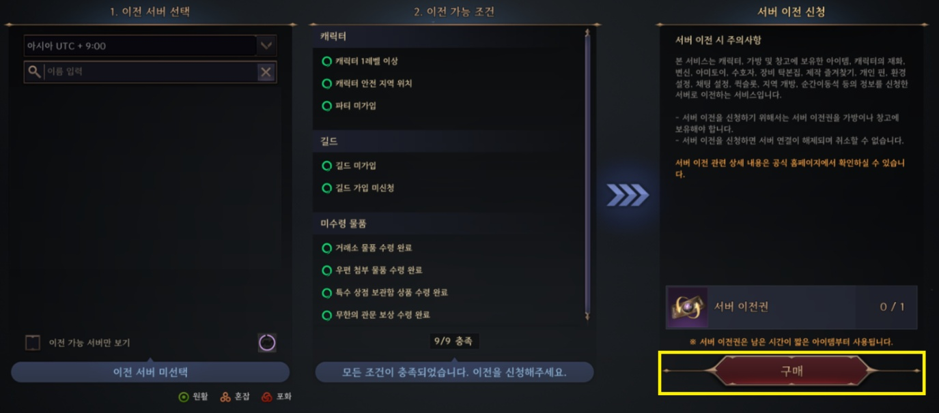
2) Once you have been taken to the Server Transfer Voucher product details screen, click the ‘Purchase’ button in the bottom right-hand corner to be redirected to the payment webpage
■ Servers available for transfer
Server Name | Servers to Which Transfer is Possible |
All servers | Roti |
Bena |
■ Detailed Guide to Server Transfers
※ Sales policies and specific rules regarding server migration are subject to change.
1) Server Transfer
- This is an additional service that allows you to transfer character information, including items held by the character (in inventory and storage), to another server.
- Please refer to section 3) ‘Conditions Under Which Server Transfers Are Not Permitted’ below for details on which items can and cannot be transferred.
2) How to Use
① You can apply for a server transfer by purchasing a Server Transfer Ticket from the Special Shop and then selecting the ‘Server Transfer’ menu.
② Select the server you wish to transfer to; provided you meet the transfer requirements, you may apply for a server transfer.
③ Once you apply for a server transfer, your connection to the server will be disconnected and you will be logged back into the game.
④ As server transfers are processed sequentially in the order they are requested, there may be variations in processing times.
⑤ Upon re-entering the game, the server transfer will be complete and your character will be automatically teleported to Castler Village.
3) Conditions under which server transfers cannot be requested
- Please note that you cannot apply for a server transfer if any of the conditions listed in the table below apply.
※ You can check the eligibility criteria for each item via the [Server Transfer] UI within the game.
Item | Conditions Under Which Server Transfer Requests Cannot Be Made |
Character | No level restriction ※ You can transfer from Level 1 onwards with no specific level restrictions. |
Characters who are members of a guild or have applied to join one | |
Characters who do not possess a server transfer ticket | |
Characters not located in a safe zone | |
Characters currently in a party | |
Currency and items | If you have items listed for sale or to be withdrawn from the Exchange, or if you have unclaimed Lucent |
If there are items in the BM Storage that have not been collected | |
If there are items in your Mailbox that have not been collected | |
If there are any unclaimed items from the Infinite Dungeon ranking rewards |
4) Character Information
- Upon successful server transfer, character information will be retained, reset or updated depending on the item; please bear this in mind when applying for a server transfer.
Item | Character Information |
Character Name | Retained |
Level and Experience Points | Yoo Ji |
Character Resources | Retained |
Token of the Contract: Dimension I | Retained |
Token of the Contract: Dimension II | Maintenance |
Token of the Covenant: Abyss | Maintain |
Kalansia’s Token | Maintain |
Bag | Retain |
Warehouse | Maintenance |
Skills | Maintenance |
Proficiency | Maintenance |
Codex | Maintenance |
Resistance Quest | Maintenance |
Growth Log | Maintenance |
Battle Pass | Maintenance |
Tidal Tower | Maintain |
Gate of Infinity | Maintain |
Equipment Rubbing Collection | Yuji |
Guardian | Yuji |
Transformation | Maintenance |
Amitoy | Maintain |
Production Favourites | Yuji |
Personal Pins | Yuji |
Settings | Keep |
Quick Slots | Keep |
Region Unlock | Retain |
Teleportation Stone | Retain |
Event Notifications | Retained |
Costumes | Retain |
Weapon Appearance | Retain |
Emotion Expressions | Retained |
Blessing of Solisium Plus benefit expiry period | Retained |
Limit on the number of purchases from the Special Shop | Retained |
Post | Retained |
Event notifications | Retained |
Personal relationships | Retain |
Treatment History | Reset |
Group chat | Reset |
Exchange Favourites | Reset |
Rankings | Refreshed in line with the refresh time of the transferred server |
5) Select a transfer destination server
- Servers marked as ‘Disabled’ in the list are those for which transfer applications have closed or to which transfers are not possible.
- There is a limit on the number of players that can transfer to each server; if this limit is exceeded, you will not be able to apply to transfer to that server.
- The server transfer list will be updated dynamically based on the population status of each server.
6) Server Transfer Complete
- Once you have applied for a server transfer and re-enter the game, the transfer will be complete and your character will be automatically teleported to Castler Village.
This article was translated from: https://tl.plaync.com/ko-kr/board/notice/view?articleId=6a5dffb035ca3417c585f4d2