
Throne and Liberty [Notice] Pre-moving your server
hello. This is THRONE AND LIBERTY.
We would like to inform you in advance that we will be moving our serverfrom Monday, 4 August 2025 at 12:00.
Please see below for more information about theserver move.
Server migration period
- Server migration period: From Monday, 4 August 2025 at 12:00 to Friday, 8 August 2025 at 22:00
Each server has a limited transfer population, and if you exceed the number of incoming characters, you will not be able to apply to transfer to that server. Please note the above and transfer well in advance of the deadline to ensure a smooth server transfer.
Server transfer ticket sales period and purchase restrictions
- Sales period: Wednesday, 21 May 2025 at 09:00 to Tuesday, 27 May 2025 at 22:00
- Purchase limit: 2 per account
- Purchase method:
* Server transfer tickets will no longer be displayed separately in the special shop, and can now be purchased directly from the [Server Transfer] screen.
1) Click the Buy button at the bottom right of the [Server Transfer] screen
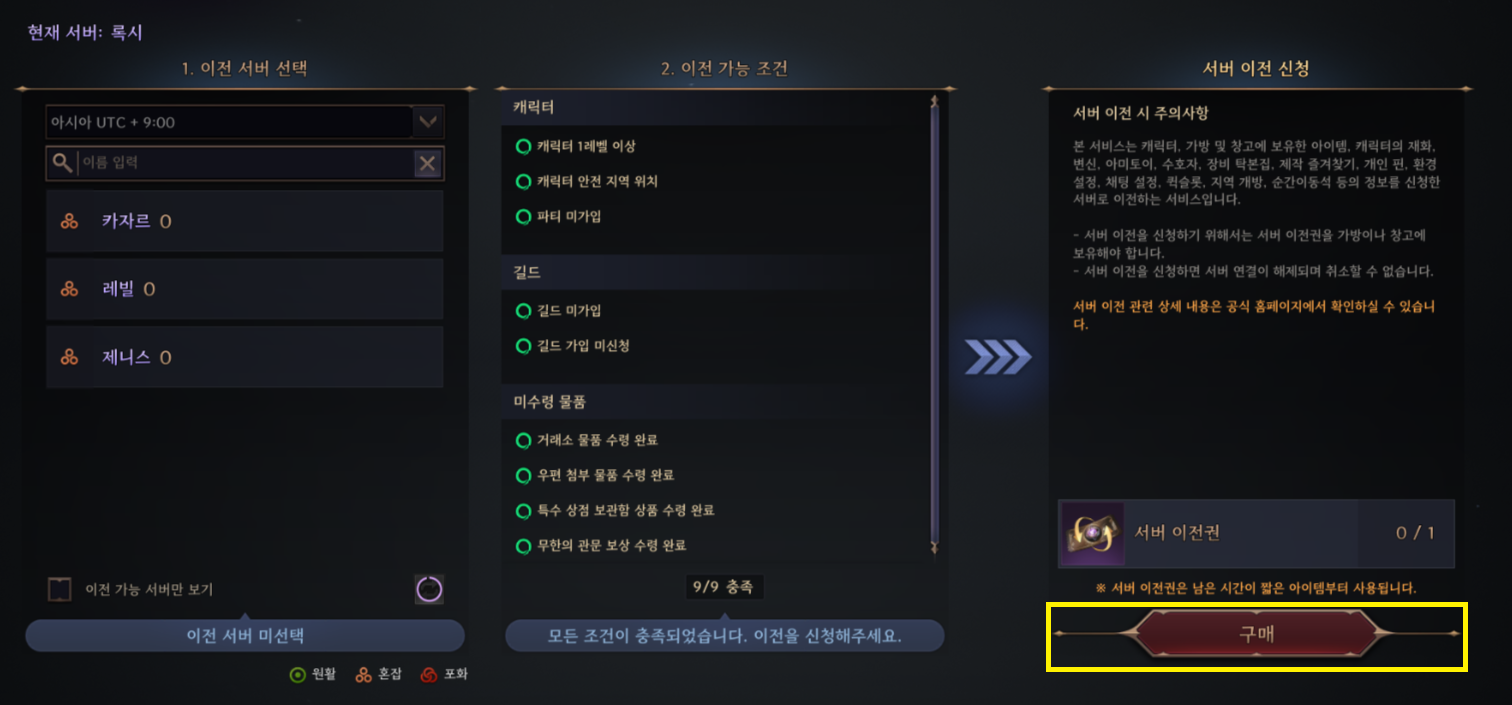
2) Go to the server transfer product details page and click the Buy button at the bottom right to go to the payment webpage. 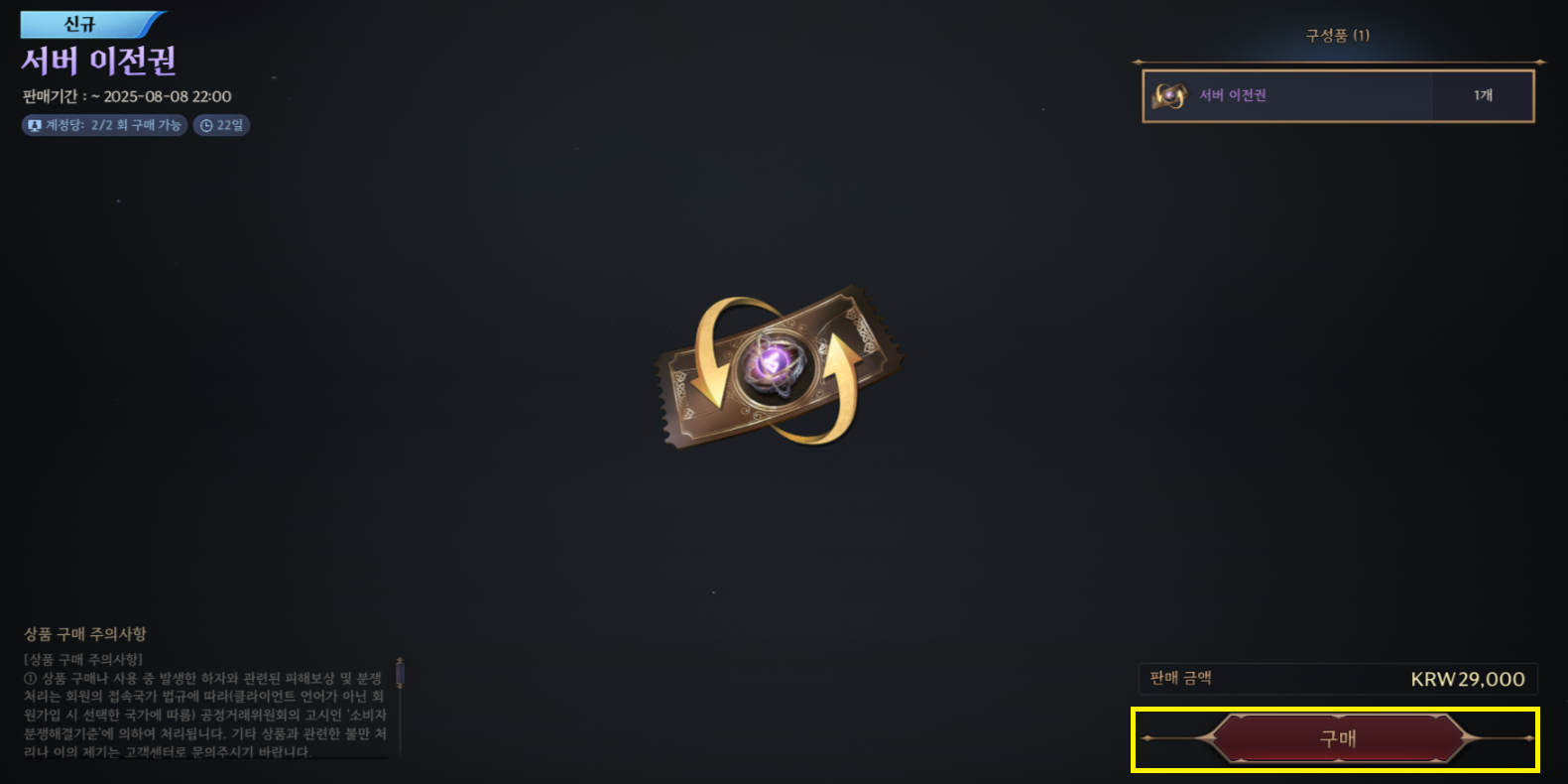
Transferable servers by server
Server name | Transferable server name |
All servers | Kalis |
Solar | |
Gridal | |
Siena | |
Beluatan | |
Sileus |
Server migration details
Sales policies and detailed rules for server transfers are subject to change.
1) Server Transfer
- This is an additional service product that allows you to transfer your character's information, including items (possessions and storage), to another server.
- Please refer to 3) Conditions for notbeing able to apply for a server transfer below to see what you can and cannot apply for.
2) How to use the service
You can apply for a server transfer by purchasing a server transfer voucher from the special shop and selecting the 'Server Transfer' menu.
Select the server you want to transfer, and if you meet the requirements, you can apply for a server transfer.
After applying for a server transfer, you will be disconnected from the server and rejoin the game.
Server transfers are processed sequentially according to the order in which they are requested, so there may be a difference in processing time.
When you re-enter the game, the server transfer will be completed and your character will be moved to Castler Town.
3) Conditions under which you cannot apply for a server move
- Please note that you will not be able to apply for a server switch if any of the following conditions apply.
You can check the conditions for each item in the [Switch Server] UI in the game.
Item | Conditions that prevent you from applying for a server transfer |
Character | No level limit Characters can be transferred from level 1 without any level restrictions. |
Characters who have joined a guild and are applying | |
Characters who do not have server transfer rights | |
Characters whose location is not in a safe zone | |
Characters in the process of joining a party | |
Goods and items | You have items listed for sale on the Exchange or have unclaimed Lucent. |
You have unclaimed items in your BM Locker | |
If you have unclaimed items in the mail | |
You have unclaimed items from the Infinite Dungeon Ranking Rewards. |
4) Character Information
- After successfully transferring to a new server, your character information will be maintained/reset/updated depending on the item, so please refer to this before applying for a server transfer.
Item | Character Information |
Character Name | Keep |
Level and experience | Keep |
Character Goods | Keep |
Proof of Contract: Dimension I | Retention |
Token of the Covenant: Dimension II | Upkeep |
Sign of the Covenant: Abyss | Uphold |
Mark of Calanthia | Upkeep |
The Bag | Upkeep |
Warehouse | Upkeep |
Skills | Upkeep |
Proficiency | Upkeep |
Codex | Upkeep |
Resistance Requests | Upkeep |
Growth Journal | Upkeep |
Battle Pass | Upkeep |
Tower of Tydal | Maintained |
Gateway to Infinity | Upkeep |
Equipment Tome | Upkeep |
Guardian | Upkeep |
Transformation | Upkeep |
Amitoi | Upkeep |
Crafting Favourites | 保持 |
Personal Pins | 保持 |
Preferences | Keep |
Quickslot | 保持 |
Open regions | 保持 |
Teleportation Stones | Maintained |
Event Notifications | Keep |
Costumes | Maintained |
Weapon Appearance | Maintaining |
Emotes | Upkeep |
Blessing of Solisium Plus Benefit Expiration | Maintained |
Limiting the number of special shop purchases | Maintain |
Postal | Maintain |
Event notifications | Retention |
Personal relationships | Retention |
Kill records | Reset |
Group chats | Reset |
Exchange favourites | Reset |
Rankings | Renew at the time of the relocated server's renewal |
5) Select a transfer server
- Servers that appear as inactive in the list are either closed or unavailable for transfer.
- Each server has a limited transfer population, and if the number of incoming characters is exceeded, you will not be able to transfer to that server.
- The server transfer list will be updated on a rolling basis based on the population of each server.
6) Completing a Server Transfer
- When you re-enter the game after applying for a server transfer, the server transfer will be completed and your character will be forcibly moved to the Castler Village.
This article was translated from: https://tl.plaync.com/ko-kr/board/notice/view?articleId=68830f500fc04e138bf093df